updated
The board is the product.
Board for this folder. w lists favorites, then recent folders, including stopped projects, and does not start them. c is opt-in container actions through dc exec --no-start. v keeps the latest 200 session events in memory and refreshes the board.
dc                  # this folder (cwd, then git root) — same as dc-tui
dc ~/src/app
dc --all            # every labeled workspace
Startup draws the dc-cli mark (host frame + phosphor pip) on first launch. Any key skips. After a successful start or shell the splash stays off. DC_TUI_NO_SPLASH=1 skips it always. The compact mark stays in the header.
While containers are discovered the header shows checking… — not stopped. stopped is only after a successful empty result. Discovery failure shows unknown (r retries). Manual reload keeps the last snapshot and shows refreshing…. Fleet / folder switches clear old context first.
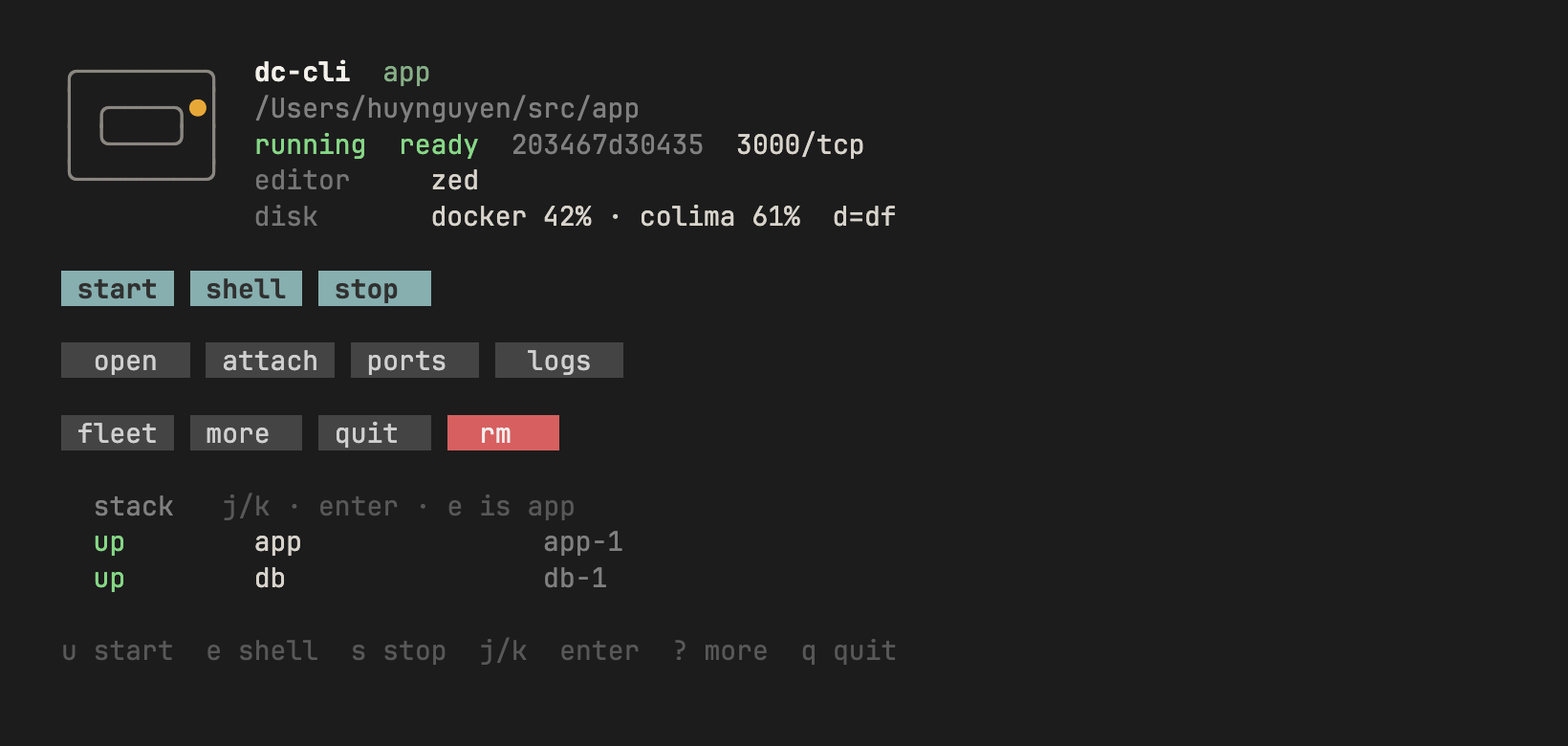
Header load line is dc-stats. Press t or click top.
Primary row: start · shell · stop. Meta is quieter. rm asks y/n. Stack / fleet: up / down, j/k or click, Enter to open or exec.
Keys
| Button | Key | Does |
|---|---|---|
| start | u |
dc up — .devcontainer uses official CLI + forward; compose-kind uses docker compose (no forward); no config confirms then dc try (default localhost ports) |
| shell | e |
dc exec — app only |
| stop | s |
full stack dc down |
| rm | x |
dc-down --rm after y |
| open | o |
host editor on the bind-mount |
| attach | a |
VS Code Remote URI; Zed prints Connect Dev Container steps. N/A for compose-kind. |
| ports | p |
dc-forward (Colima sidecar) |
| url | 1–9 / click |
open a published website in the host browser |
| logs | l |
follow docker logs for the selected stack row (highlighted; q back). Fleet refuses. |
| restart | R |
restart the selected stack sibling. Labeled app row refuses (u/s). Fleet refuses. r still reloads. |
| top | t |
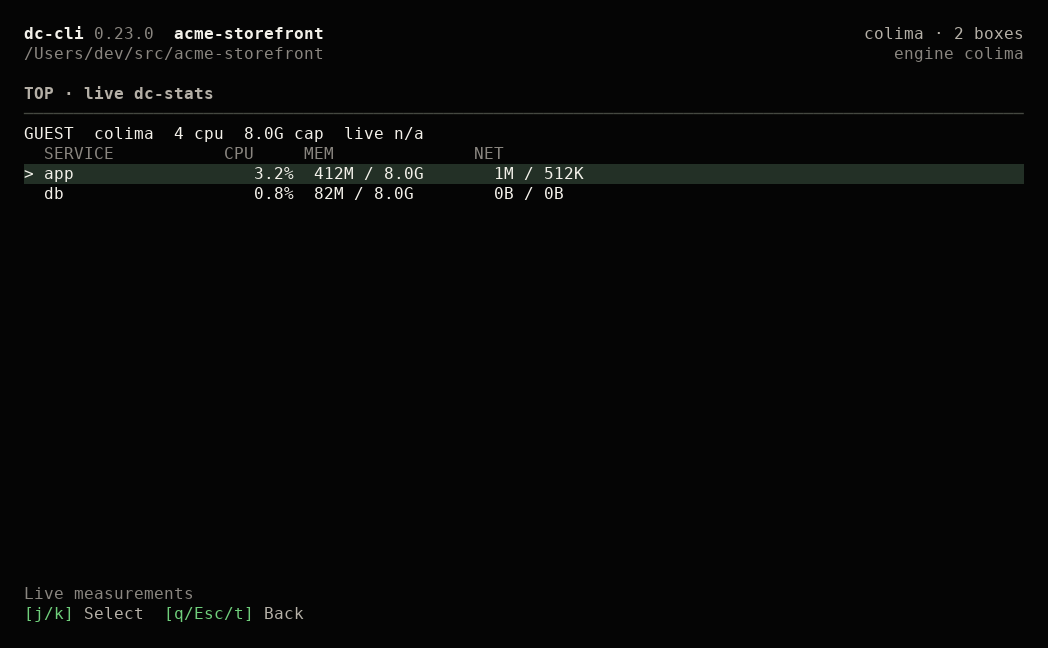
CPU / RAM for this folder (stays in TUI). Fleet refuses. |
| nets | n |
this folder’s declared compose nets. y creates missing externals then start. Fleet refuses. |
| db | b |
dc-db — host TablePlus on a declared db port |
| files | m |
dc-files — yazi/nnn in the box; Enter opens code/cursor on this container (DC_FILES_EDITOR=vim keeps vim) |
| fleet | f |
other workspaces |
| workspaces | w |
recent folders this board opened. Type to filter, Enter open, Ctrl+F favorite, Ctrl+D forget, Esc back. Works while Docker is down. |
| actions | c |
project actions (personal + trusted .dc/actions.json). Enter runs one via dc-exec --no-start; off entries open a review. Fleet refuses. |
| activity | v |
this folder’s container events, latest 200 in memory. j/k, PgUp/PgDn, g/G scroll; c clears; Esc back. Fleet refuses. |
| upgrade | U |
when a newer release is available — confirms then dc-upgrade --yes |
| more / quit | ? / q |
legend / exit |
| disk | d |
dc-df report (stays in TUI). P = safe prune when the header says CRITICAL |
| rows | j/k, Enter |
cursor; fleet opens a folder, stack execs |
Header shows a compact disk line from dc-df, an app load pulse from dc-stats, and declared compose nets when present. When a newer GitHub release exists, a banner points at U / dc upgrade. d is still the disk document. When usage looks ≥85%, the disk line says CRITICAL and P confirms dc-prune --yes on the board. t is live CPU/RAM for this folder (q back). n lists this folder’s required nets (y creates missing external: true bridge nets, then dc-up --create-nets). Fleet refuses t and n. Desktop guest is cap only. CLI twins: dc-stats / dc-net. Docker not ready opens the Recover board — [f] applies dc-recover --yes, then start/shell return.
App vs other services
| Target | Command | How |
|---|---|---|
| labeled app | dc-exec / key e |
devcontainer exec |
| any other compose service | click the stack row, or dc-exec --service NAME |
start if down, then exec |
dc with no args (or dc tui) is the board. Hyphenated dc-tui stays.
Project actions
Same files as dc actions (dc-actions). Personal file: ${XDG_CONFIG_HOME:-~/.config}/dc-cli/actions/<sha256 of the folder path>.json. Shared file: <folder>/.dc/actions.json (dc-cli never writes it).
{"schemaVersion": 1, "actions": [
  {"id": "test", "label": "Run tests", "argv": ["go", "test", "./..."]},
  {"id": "psql", "label": "DB shell", "argv": ["psql", "-U", "app"], "service": "db"}
]}argvruns as-is — no shell.servicetargets that compose sibling (docker exec); without it the labeled app (devcontainer exec, keeps remoteUser / workdir).- A personal
idoverrides the shared one. - Shared actions are off until trusted. The review lists every shared command (overridden ones too) with its exact argv and target. Trust is tied to the folder and the file’s exact bytes; any change turns them off.
- Actions never start containers (
dc-exec --no-start). Start withufirst. - Actions run inside your containers and can modify data.
dc actions list --json
dc actions trust          # preview, then y/N (non-TTY needs --yes)
dc actions run test
dc actions run -- -id     # an id that starts with -
Activity
v opens a timeline of this folder’s container events: created, started, stopped, exited (exit code), restarted, removed, out of memory, health. Each line is time, service (or container name), and a short description — never env or logs.
- One
docker eventsstream, pinned to the engine the board is showing, runs while the board is on a folder. It stops when you switch folders, enter fleet, leave for a shell / start / files / action, Docker goes away, or you quit; it resumes (and the board rescans) when you are back. - Only containers that belong to this folder count: the ones the last refresh listed, or a new one that a read-only
docker inspectproves is the labeled app, one of its compose siblings, or (compose-kind) the project whose working dir is this folder. Port sidecars and other projects are left out. - Events refresh the board at most once per 300ms burst.
- Stream lost → a gap line, retries after 1s, 2s, 4s, then every 10s, and a full rescan on reconnect.
- Latest 200 lines, memory only. Cleared on folder switch, fleet, or
cin the view.
See also ports.
FAQ
- What is the difference between open and attach?
- Open is the host editor on the bind-mount (Zed, VS Code, Sublime). a / dc-open --attach is the VS Code Remote URI into Linux. Zed attaches itself. Sublime cannot.
- How do I work inside the container in Zed?
- dc-up then dc-open. In Zed use Project: Open Remote → Connect Dev Container. dc-cli owns ports, stop, and fleet. Zed does not publish forwardPorts. No extension.
- Does e / shell enter a compose sidecar?
- No. e and shell are always the labeled app. Click a stack row, or dc-exec --service NAME, for siblings.
- Why does the TUI come back after shell or logs?
- A normal exit is not a crash. The board announces leave, then resumes so you can hit the next verb.
- What does R do versus r?
- r reloads the board. R restarts the selected compose sibling (dc-exec --service NAME --restart). The labeled app row refuses — use u/s. Fleet refuses R. --id --restart is invalid.
- Why does the header say checking instead of stopped?
- checking… means discovery is still running. stopped means discovery finished and no container is there. unknown means discovery failed — press r. Manual reload keeps the last snapshot and shows refreshing….
- How do I move without the mouse?
- j/k or arrows move the cursor. Enter opens a fleet folder or execs the selected stack row.
- How do I open the forwarded website?
- After start, website ports (80, 443, 3000, 5173, 8000, 8080, 9001, …) become clickable http://127.0.0.1:PORT tiles. Keys 1–9 open the first nine. Databases stay off that row — press b / dc-db.
- How do I open TablePlus on the stack database?
- b or dc-db. Uses the host port you already set on the db service (compose ports or a well-known forwardPorts number). No declared map → refuse. Two DBs need dc-db --service NAME.
- What is the difference between d and t?
- d dumps dc-df (disk document). t opens live CPU/RAM for this folder via dc-stats. Fleet refuses t. Desktop guest is cap only — it never invents a live percent. When disk looks critical, P confirms dc-prune --yes on the board.
- What does c / actions do?
- c lists this folder's project actions: your personal file plus a shared .dc/actions.json. Shared ones stay off until you review every command and press y; any edit turns them off again. Enter runs one in the foreground through dc-exec --no-start — the container must already be running, nothing is started. Ctrl+C stops the action and the board comes back with its exit status. Actions run inside your containers and can modify data.
- What does w do?
- w lists folders this board opened before (favorites first, then most recent). Type to filter, Enter opens, Ctrl+F favorites, Ctrl+D forgets (the folder is untouched), Esc goes back. It works while Docker is down and never starts anything.
- What does v / activity do?
- v shows this folder's recent container events — created, started, stopped, exited (with exit code), restarted, removed, out of memory, health. Latest 200, in memory only: nothing is written to disk and it clears when you switch folders, enter fleet, or press c in the view. Only containers proven to belong to this folder count (the labeled app and its compose siblings, or the compose-kind project); dc-cli port sidecars and other projects are left out. No env or log text is kept. If the event stream drops, the view marks the gap and the board rescans when it reconnects.
- What does n / nets do?
- n lists this folder's declared compose networks. Missing external:true names can be created as a default bridge (y then dc-up --create-nets). Compose-managed nets are shown, not created. Overlay, custom IPAM, and inspect-unknown are refused. Fleet refuses n.
Broke something?report it